Friday, January 12, 2018

JWT Sample Code

Json Web Token.

Looks like Json Web Tokens or simply JWT is having a lot of popularity that Microsoft released a library to encrypt and decrypt those tokens.

In order to generate a JWT token you should install this nuget package

System.IdentityModel.Tokens.Jwt

Then you can generate tokens that contain information like CompanyId, UserName or even password as follows

        private  string Secret = "db3OIsj+BXE9NZDy0t8W3TcNekrF+2d/1sFnWG4HnV8TZY30iTOdtVWJG8abWvB1GlOgJuQZdcF2Luqm/hccMw==";

        public  string GenerateToken()
        {
            // var hmac = new HMACSHA256();
            //Secret = Convert.ToBase64String(hmac.Key);

            var sKey = Convert.FromBase64String(Secret);
            var tHandler = new JwtSecurityTokenHandler();

            var tDesc = new SecurityTokenDescriptor
            {
                Subject = new ClaimsIdentity(new[]
                {
                    new Claim("companycode", "companycode"),
                    new Claim("username", "username"),
                    new Claim("password", "password"),
                    new Claim("companyid", "25"),
                }),

                Expires = DateTime.UtcNow.AddMinutes(45),
                SigningCredentials = new SigningCredentials(new SymmetricSecurityKey(sKey),SecurityAlgorithms.HmacSha256Signature),
                Issuer = "HajOnSoft.com"
            };

            var stoken = tHandler.CreateToken(tDesc);
            return  tHandler.WriteToken(stoken);
        }

In the generate token method, you can add claims to pass parameters as you please.


To get a specific value from the token you can call a method like this

        public  int GetCompanyId(string token)
        {
            try
            {
                var tokenHandler = new JwtSecurityTokenHandler();
                var jwtToken = tokenHandler.ReadToken(token) as JwtSecurityToken;

                if (jwtToken == null)
                    return -1;

                var symmetricKey = Convert.FromBase64String(Secret);

                var validationParameters = new TokenValidationParameters()
                {
                    RequireExpirationTime = true,
                    ValidateIssuer = false,
                    ValidateAudience = false,
                    IssuerSigningKey = new SymmetricSecurityKey(symmetricKey)
                };

                SecurityToken securityToken;
                var principal = tokenHandler.ValidateToken(token, validationParameters, out securityToken);
                var myClaim = jwtToken.Claims.FirstOrDefault(x => x.Type == "companyid");
                if (myClaim != null)
                    return int.Parse(myClaim.Value);
                else
                {
                    return -1;
                }
            }

            catch (Exception ex)
            {
                return -1;
            }
        }


for more information visit
http://techcerberus.blogspot.com/2017/03/jwt-in-aspnet-web-api-and-mvc.html


Sunday, December 17, 2017

On MicroServices

Microservices is Service Oriented Architecture done well. It is based on creating small services (micro-sized) that are focussed on a business domain and are small enough to be called Micro. Every microservice service should be doing one thing (one thing only) and doing it very well. should be light weight and technology agnostic and communicate via something like http REST, each service should own its own database and be independently changeable and deployable. Every transaction will most likely be completed by many services and because there are many services there should be a way to monitor them.

Every Microservice should be Coherent and that means it is focussed on doing one thing, it should not change because another service is changing or a new column in some database is being added. That means when adding new functionality you should add a new micros service. You micorservice should have only one reason to change.
Autonomous, Should be independent and own its contracts, independently developed. should probably respond right away via asynchronous patterns, you should also look into Message Queue, RabbitMQ and ATOM. Observable, You should have a central monitoring System to know what services are operational now and what is their individual health status. monitor exceptions, centralized logging, maintain correlation ID, etc.. there are many software solutions that provide this out of the box already like Azure Service fabric. basically every service should be able to register itself so that other services can discover it is up and running. Resilient, Services should also be able to fail gracefully and provide default values when they are not operational.

You may however provide an API gateway for all clients as an entry point for all Microservices. the API gateway can perform some common tasks like authentication and then relay to the specific microservice. 

Every microservice should own its own database, for shared data you can create a separate microservice for static or shared data but should not provide a single monolithic service for all system wide CRUD operations since it will continuously change which is against the first princible which is cohesion.

Monday, November 27, 2017

Tree traversal

If you will be asked in an interview to traverse a tree most likely it will not be depth first or breadth first but rather it will be a special traversal. You will be given a hierarchical table with ID's and parent ID's like the following table for instance.
The table below indicate that the first two nodes has no parent for instance, and then few nodes are under one of them and so on.

ID ParentId Name
5 null Grandfather
8 null Grandmother
7 5 son 1
4 5 daughter
2 5 son 2
3 7 grandchild

and then you will be asked to print the above nodes as follows
-Grandfather
        -Son 1
                -Grandchild
        -daughter
        -Son 2
-Grandmother

Here is the solution with explanation

class Program
    {
        static void Main(string[] args)
        {
            var n = MakeModel();// Make the model  
            PrintNode(n, new Customer{ID = -1, ParentId = null, Name = "-1"}, -1); 
            //Pass one node that can combine the root nodes under it
            Console.ReadKey();
        }

        private static void PrintNode(List<Customer> nodes, Customer n, int dept)
        {
            //Algorithm
            //When readhing a node, immediately print it
            //Get all children for the current node and recursively call the same method passing a child node at a time
            //each time you go one level deeper increase a the depth variable that maintaines 
            //how deep in the tree you are now
            if (dept >= 0) Console.WriteLine( new String('\t', dept) + "-" +  n.Name);
            var children = nodes.Where(x => x.ParentId == n.ID).ToList();
                foreach (var child in children)
                    PrintNode(nodes, child, dept + 1);
                    //Code here will execute on the way back
        }

        private static List<Customer> MakeModel()
        {
            var output = new List<Customer>
            {
                new Customer {ID = 5, ParentId = -1, Name = "Grandfather"},
                new Customer {ID = 8, ParentId = -1, Name = "Grandmother"},
                new Customer {ID = 7, ParentId = 5, Name = "Son 1"},
                new Customer {ID = 4, ParentId = 5, Name = "daughter"},
                new Customer {ID = 2, ParentId = 5, Name = "Son 2"},
                new Customer {ID = 3, ParentId = 7, Name = "Grandchild"}
            };
            return output;
        }
        
    }


    public class Customer
    {
        public int ID { get; set; }
        public int? ParentId { get; set; }

        public string Name { get; set; }

    }

Wednesday, November 01, 2017

Merge two sorted arrays

//Given two sorted integer arrays A and B, merge B into A as one sorted array.
            //example 1346789
            //        35689  

            var arr1 = new List<int> { 4,5 };
            var arr2 = new List<int> { 1,2,3 };

            //Loop length of arr1 - start 0 untill end of array - p = index
            //Optimization use shortest array 
            //Pick element at p, compare it with all elements in arr2 - Loop Arr2 start from last point examined
            //if arr1 Element <= arr2 element and < arr2
            //insert arr1 element left of arr2 element, otherwise keep going
            var r2 = arr2.Count;
            for (int p = 0; p < arr1.Count; p++)
            {
                for (int j = 0; j < r2; j++)
                {
                    if (arr1[p] <= arr2[j])
                    {
                        arr2.Insert(j, arr1[p]);
                        r2 = arr2.Count;
                        break;
                    }

                    if (j == r2-1) //Last item in arr2 and loop did not break above
                    {
                        arr2.Add(arr1[1]);
                        r2 = arr2.Count;
                    }
                }


            }

Insertion Sort

 var arr = new List<int> { 5,6,1,2,3,1 };// input.ToCharArray().Cast<int>().ToList();
            //Loop length of array - start from second position
            
            //Compare pointer to previous item
            //make smaller to the left untill you reach the beginning of the array

            var currentItem = 0;
            for (int p = 1; p < arr.Count; p++)
            {
                currentItem = arr[p];
                //Loop from current p position to beginning of array - pointing at location of comparison with current item and potential location of currentItem
                //If currentItem is smaller then swap 
                for (int i = p - 1 ; i >= 0; i--)
                {
                    if (currentItem < arr[i])
                    {
                        var temp = arr[i];
                        arr[i] = currentItem;
                        arr[i+1] = temp;
                    } 
                    else
                    {
                        break;
                    }
                }
                
            }


Tuesday, October 31, 2017

Find Peak

            //given a number of characters find the peak character which is the current that is repeated the most, there can be more than one character at the peak if the number of repeatition tie
            var input = "abbabacdexxxxxxdx"; //return x
            var arr = input.ToCharArray();
            arr = arr.OrderBy(x=> x).ToArray(); //order the list to know when to stop counting occurence
            //Initialize result container
            var result = new List<char>();
            //Loop length of array - pointing to index from left p = 0 
            var currentMax = 0;
            var prevChar = arr[0];
            var r = 0;
            for (int p = 0; p < arr.Length ; p++)
            {
                if (arr[p] == prevChar)
                {
                    r++;
                }
                else
                {
                    if (r > currentMax)
                    {
                        result = new List<char> { arr[p - 1] };
                    }
                    else if (r == currentMax)
                    {
                        result.Add(arr[p - 1]);
                    }
                    currentMax = r;
                    prevChar = arr[p];
                    r = 1;
                }
            }
            //Keep previous character
            //Compare arr[p] to previous 
            //Equal count repeatition r of a
            //not equal stop counting repeatition and compare to max if less than max discard 
            //If equal to max append to peak
            //if less than discard
            //greater than max 
            //discard output collected previously and initialize it only with this character

            if (r > currentMax)
            {
                result = new List<char> { arr.Last() };
            }
            else if (r == currentMax)
            {
                result.Add(arr.Last());

            }

Reverse string without its special characters

Special characters need to stay in place while the entire string is reversed

 //Reverse string without moving any special character from its place
            var input = "ab$cde#x"; //"xe$cdb#a";
            var arr = input.ToCharArray();

            var h = -1;
            var t = -1;
            //Loop - half length of the array with pointer index of array from left
            for (int p = 0; p < arr.Length/2; p++)
            {
                //Find non special character from left
                if (Regex.IsMatch(arr[p].ToString(),"[a-z]") && h < 0) //non special character
                    h = p;

                //Find non special chracter from right
                if (Regex.IsMatch(arr[arr.Length - p - 1].ToString(), "[a-z]") && t < 0) //non special character
                    t = arr.Length - p - 1;


                //If holding two non special chracters then swap them
                if (h >= 0 && t >= 0) //Non special chracters both directions
                {
                    //Swap
                    var temp = arr[h];
                    arr[h] = arr[t];
                    arr[t] = temp;

                    h = -1;
                    t = -1;
                }


            }

Rotate Array

Rotate an array of n elements to the right by k steps.
For example, with n = 7 and k = 3, the array [1,2,3,4,5,6,7] is rotated to [5,6,7,1,2,3,4]. How many different ways do you know to solve this problem?

Using LINQ
            var arr = new List<int> { 1, 2, 3, 4, 5, 6, 7 };
            //Rorate array to the right
            var k = 10 % 7;

            //should move to the beginnning
            var output = arr.Skip(arr.Count - k).ToList();
            output.AddRange(arr.Take(arr.Count - k));
         

            Console.ReadLine();

Using Add Method

 var arr = new List<int> { 1, 2, 3, 4, 5, 6, 7 };
            //Rorate array to the right
            var k = 10 % 7;
            //Move the head of the array to the tail number of times = k
            for (int i = 0; i < arr.Count - k; i++)
            {
                arr.Add(arr[0]);
                arr.RemoveAt(0);
            }

Using Insert
 var arr = new List<int> { 1, 2, 3, 4, 5, 6, 7 };
            //Rorate array to the right
            var k = 10 % 7;
            //Move the head of the array to the tail number of times = k
            for (int i = 0; i < k; i++)
            {
                arr.Insert(0, arr.Last());
                arr.RemoveAt(arr.Count -1);
            }

Reverse Words in a string

Given an input string, reverse the string word by word. A word is defined as a sequence of non-space characters.
The input string does not contain leading or trailing spaces and the words are always separated by a single space.
For example,
Given s = "the sky is blue",
return "blue is sky the".
Could you do it in-place without allocating extra space?

            
Allocating Extra space for output

var input = "ayman ali";
            input = " " + input;
            var arr = input.ToCharArray();
            var output = string.Empty;
            var b = 0;
            var e = arr.Length;
            for (int p = arr.Length - 1; p >= 0; p--)
            {
                if (arr[p] == ' ' )// little off beginning of word
                {
                    b = p + 1;
                    output += input.Substring(b, e - b) + " ";
                    e = p ;

                }
            }
            Console.WriteLine(output.TrimEnd(' '));

            Console.ReadLine();

Without allocating extra space
            //Reverse words in string
            var input = "ayman ali";
             input = input + " ";
            var arr = input.ToCharArray();
            //Loop - Pointer (p) is index - Length is length of array
            //If space found - e = p - 1, begin (b) saved from before
            //Reverse string in place
                //Loop half length of string
                //i to m (Mirror) m = e-i

            //Reverse whole string

            var b = 0;
            var e = 0;
            for (int p = 0; p < arr.Length ; p++)
            {
                if (arr[p] == ' ')
                {
                    e = p - 1;
                    for (int i = b; i < (b+ (e-b) /2); i++)
                    {
                        var temp = arr[i];
                        var m = e - (i - b);
                        arr[i] = arr[m];
                        arr[m] = temp;
                    }
                    b = p + 1;

                }
            }
            //arr need to be revsrsed
            e = arr.Length-1;
            for (int p = 0; p < e/2; p++)
            {
                var temp = arr[p];
                var m = e - p - 1;
                arr[p] = arr[m];
                arr[m] = temp;
            }

            Console.WriteLine(string.Join(string.Empty, arr.Take(e)));
         
            Console.ReadLine();

Monday, October 30, 2017

Reverse Word Characters in Place

Given a string, Reverse every word in the string in place. For example if you have Ayman Ali, running the algorithm should result in namyA ilA.

Solutions
            //Reverse words in string
            var input = "ayman ali";
            input += " ";
            //Convert into Array
            var arr = input.ToCharArray();
            //Loop Through the array with the length of the array
            var b = 0; //Pointer to an actual element
            var e = 0;
            for (int i = 0; i < arr.Length; i++)
            {
                if (arr[i] == ' ') //Space reached
                {

                    e = i - 1;
                    //Rotate in place
                    for (int p = b; p < e - ((e-b) / 2); p++)
                    {
                        var temp = arr[p];
                        var m = e - (p - b);
                        arr[p] = arr[m];
                        arr[m] = temp;
                    }
                    b = e + 2;
                }
            }
            //If first element note b = Begin of new word
            //IF space or end of string
            //      Record the position as end of word (e)
            //      Rotate the word beginning with b and ending with e
            //      let b = e + 2
            //Else 
            //      Continue
            //End Loop


            //Rotate a word
            //Loop through the word (Length half the word) begin with b and end with e
            //Save Pointer element temporarily
            //Save mirror position (m) into pointer position (p) - Define mirror position 
            //save p into m

            Console.WriteLine(string.Join("",arr.Take(arr.Length-1)));

           //Console.WriteLine(string.Join(",", out));

            Console.ReadLine();

Tuesday, June 06, 2017

File upload and unzipping files

If you want to unzip a file here are few lines that unzips a zip file and delivers the contents as a stream. Here I am assuming the zip file contain images

 if (fuPhotos.FileName.ToLower().EndsWith(".zip"))
                {
                    var za = new System.IO.Compression.ZipArchive(fuPhotos.PostedFile.InputStream);
                    foreach (var entry in za.Entries)
                    {
                        var img = System.Drawing.Image.FromStream(entry.Open());
                        img.Save(@"c:\temp\" + Path.GetFileName(entry.FullName));
                    }
                }


 if (fuPhotos.FileName.ToLower().EndsWith(".zip"))
This line allows you to check the extension so you are certain the user is uploading a zip file. the extension is one way of detecting that.


var za = new System.IO.Compression.ZipArchive(fuPhotos.PostedFile.InputStream);
This line will get the stream of that file, you need to get a stream because the stream is a generic object that you can handle with other classes like StreamReader, StreamWriter, FileStream, MemoryStream and other objects like System.Drawing.Image that can get you an image from a stream

 foreach (var entry in za.Entries)
This line allows you to loop to work on every entry in the zip file. the entry is a file inside the zip file. you can access its name, contents, etc..

var img = System.Drawing.Image.FromStream(entry.Open());
The Image class can read a stream and entry.Open gets the stream of the entry

img.Save(@"c:\temp\" + Path.GetFileName(entry.FullName));
This line allows you to save the stream


You can deal with multiple files if the user uploads multiple files if you change your code as follows

foreach (var onezipFile in fuPhotos.PostedFiles)
                {

                    if (onezipFile.FileName.ToLower().EndsWith(".zip"))
                    {
                        var za = new System.IO.Compression.ZipArchive(onezipFile.InputStream);
                        foreach (var entry in za.Entries)
                        {
                            var img = System.Drawing.Image.FromStream(entry.Open());
                            img.Save(@"c:\temp\" + Path.GetFileName(entry.FullName));
                        }
                    }

                }

Thursday, January 26, 2017

How to deliver your baby in Canada for Free (Almost)

If you do not have health insurance when you first arrive to Canada and you are pregnant it will be very expensive to deliver your baby without insurance. Normal delivery is $3,000 and C-Section can reach $10,000 for more information you can review this report.

There is a free service that you can benefit from called Community Midwifes which can help you deliver for $600 including all lab work and hospital fees.

To start you need to visit Access Point on Jane which is a community center located at
761 Jane St. 2nd Floor, Toronto, ON M6N 4B4 on Thursdays from 4:00 to 7:00 PM 416-760-8677
They will interview you and ask if you are a landed immigrant and waiting for OHIP? They do not usually check ID or landing papers but it is better if you have them with you. Then they will transfer you to the nearest midwife clinic, one of them is located at 344 Bloor street west and is called Community Midwifes of Toronto. and their telephones are.


Then you will be able to see your midwife once every two weeks and then once every week, for all blood,  lab work and ultrasound they will give you a letter (which works as your insurance) that looks like this and this letter you can give to the lab and the lab will not charge you any thing.


Here is a list of all the labs that accept this payment letter.

For ultrasound they will give you a request that looks like this


If you need to see a doctor then you must talk to the midwife and she will transfer you to a doctor, not every doctor accept their payment letter but one who does is Dr. Susan Sheppard. Tel: 416-867-3728 located at 410 Sherbourne St., 4th Floor, Toronto, Ontario, M4X 1K2. For more info please visit 

The doctor can also send you to do some lab work and it is better if you go to the same list of labs above. The doctor may send you to a different lab, but you need to ask her to give you the request on ministry of health form.

If you are strong enough you can delivery in a birth center without Epidural, Toronto birth center is located at 525 Dundas St E, Toronto, ON M5A 2B6 and you can call to request a tour (416) 366-8080.


The final step is actual delivery. If you are going to delivery in the birth center then it is totally free and you do not need to pay anything. If you prefer to have an easier delivery using Epidural then you need to deliver at the hospital once of the hospitals affiliated with midwifes is St. Michael hospital which is located at 30 Bond St., Toronto, Ontario M5B 1W8.

The hospital requires a payment of $600 which covers 3 days at $200/day. your midwife will give you an admission letter and another letter like this that you need to take to the hospital and pay $600 which is a great deal.


With this payment, you will not pay any thing else for any lab work or medicine at the hospital. Even Epidural is covered in these $600.

Finally, they will give you a paper to keep in case of emergency and in case you had to go to any other hospital. These two papers contain all information about you and they look like this


Now, you should prepare for your C-Section appointment, Ours was by Dr. Howard Berger and you need the direct hospital number, their 15th Floor number is 416-864-5252

After birth, your baby will either feed on breast milk or formula and may suffer a little bit of Jaundice and you will be seen by a Pediatric in the hospital.

No matter what you do, do not go to 61 Queen st E, to see Dr. Cheema. This clinic is very unprofessional, our appointment was at 8:45 in the morning, we arrived at 8:25 AM and have only been seen at 10:00 AM imagine? they seem to be disrespectful of people's time. you will be disappointed that you keep your daughter undressed and ready to be seen for an hour.

I hope this information helps you have a smooth planning to this magical moment and best of luck.

Wednesday, January 30, 2013

Calling Javascript from Content Page

Is it really easy with play with JavaScript? for instance, If you have a content page within or referencing a master page. your content page has a drop down box and a text field.

You want to show or hide the text field based on the drop down box contents.

Let's say the drop down contain a list of airports for the user to choose from. only if the user chooses the value other in this drop down, you want to show the text field.

It may not be as simple as

if (dfcDropDown.Text == "Other") dfsTextBox.Visible = True; else dfsTextBox.Visible = False;

It will be little more involved than that.

First you need to write a function in Java script. This funtion you can not just put it anywhere in the aspx. you have to put it under the asp:Content tag. which might look like this

<asp:Content ID="BodyContent" runat="server" ContentPlaceHolderID="MainContent">

Second you need to make a java script block and write your function using GetElementById. When calling getElementById, the Id of the control will be little tricker. you can not as a matter of fact put the Id of the control directly. you must use a syntax like this &lt;%=dfcDropDown.ClientID%&gt; to get the name of the control at run time. Here is a sample Javascript method that will hide the text box based on the drop down box value


<script type="text/javascript">
           function ShowHideTextBox() {
           if (document.getElementById('<%=dfcDropDownBoxt.ClientID%>').value == "Other")
               document.getElementById('<%=dfsTextBox.ClientID%>').style.display = 'none'; //hide textbox
                 else
               document.getElementById('<%=dfsTextBox.ClientID%>').style.display = 'block'; //show textbox
           }
</script>


Now, we have a code that will do what we need and we need to trigger this code when the use changes the value of the drop down box. well, we can not hook this code directly to the drop down box from within the aspx. we have to use the code behind to do that. it turns out that the onChange event is not available from within the aspx page. We must hook the onChange event using c# like this

 dfcdropDown.Attributes.Add("onChange", "ShowHideTextBox();");

and we must do this in the code behind.

Not that simple haaa;

Wednesday, March 14, 2012

Reactive Extensions Gems

As I am learning about reactive extensions I want to post some code that I think is useful. Before using the code here you may want to download Reactive Extensions for your .Net Framework version. It is located at http://www.microsoft.com/download/en/details.aspx?id=24940

Observable.Interval(TimeSpan.FromSeconds(1)).Subscribe(DoSomething);
What it does: it will call a method called DoSomething that acceptes one parameter of type long.
What can you do with it: You can use this line to call the DoSomething every second and send emails for example. before this line you can retrieve the list of customers to send emails to, and every second grab one customer and send email to him/her

Observable.Timer(TimeSpan.FromSeconds(5),TimeSpan.FromSeconds(1)).Subscribe(DoSomething);
What it does: Call a method every second after waiting for three seconds initially.
What you can do with it: You can send emails to customers after waiting a specific perdiod of time.

Wednesday, February 08, 2012

Silverlight Gems

Response.Redirect

System.Windows.Browser.HtmlPage.Window.Navigate(new Uri("http://cnn.com")); //You can use "_blank" as a second paramter to popup the cnn.com in a new window


Response.QueryString
System.Windows.Browser.HtmlPage.Document.DocumentUri.Query;

Monday, February 28, 2011

Tips for Pilgrimage to Mecca

I already wrote my experience in the Hajj of 2010 which was in Arabic and can be found here, I still have some more tricks and tips that can make your trip a lot easier. Those tricks has to do with making phone calls, transportation etc...

You should take with you

1- Odorless Soap, so you can wash after going to the toilet. You will not have time for shopping and may not find what you need.

2- Hair cutter, when you need to cut your hair you will find everyone busy and expensive. Imagine millions are looking for barbershops.

3- Towel, Some of the temporary hotels you will stay in will not provide towels. Also in the tents you are on your own.

4- Container for Zamzam water. If you buy containers from there, you will have to walk to find a store and it will be expensive.

5- Your laptop. Usually hotels will have Wifi and you can call your family using any VOIP

6- Bring your VOIP telephone (Or Magic Jack), you can connect it to the hotel internet and call your family.

7- Bring your cell phone (some people says don't because you will lose it, I'd say bring it but don't take it outside the hotel). You can get STC SIM card for 40 Rial (Pre loaded with 50 Rial)and call 902 they will give you daily internet on you SIM card. 10 Rial for one hour or 24 Rial for the whole day. They will send you a message if you click the link on it, it will setup your tel. Make sure your tel support arabic otherwise ask them to send you the message in English.

8- More than one Ihram cloth. you will need one more and washing them is the same as buying new ones. I would say bring three total.


What to do

1- When finishing tawaf try to get out gradually. if you find yourself on the 7th round and close to Kaaba try to exit the tawaf gradually and not one time.

2- After your done with Jamarat continue walking and you will find yourself out


3- in your telephone always bookmark the important locations in the map. with your GPS you can go back. Places like your tent will be ex termly important when you get lost. bookmark the location of el 7aram so you can go back to it if you get lost.

4- Go to Tan3eem to make another Omra (you can make Omra any number of times) Tan3eem bus is two Rial each way.

5- Best times for Omra (7aram will be kinda empty) 9-10 AM , 1-3 AM, 1-3 PM

6- If you are with a group, then hold hands during tawaf. you will support each other and will not fall.

7- Be vigilant they will ask women to sit in a separate area close to prayer times. If you sit beside your wife and hoping you will pray beside each other, it may not happen. They will ask women to leave their space and go somewhere else. If you are looking for a place for prayer and you see some women sitting there you can wait and take their place when they ask them to leave.

8- In Medina, best times to pray in Rawda 1:30 AM. stand b Seddek Door, they will open at 2:00 AM

9- Do not take Taxi's just wave to any car, it will stop and you can negotiate the price to go anywhere.

10-If you will take the bus from Azizia to Mena, and the bus will make two trips. get in the second trip not the first. The first trip the guide may get lost, so do not go in the first trip unless you enjoy getting lost.

11- If you can have a motor cycle for the last day of Hajj or bicycle, you will be a king in transportation.

Here is a summary for Hajj days.

Day 8 Thu Hejja (Tarwiya): sleep in Menna, wakeup at 5:00 am. Fajr prayer then bus to Arafat.

Day 9 Thu Hejja (Arafa): stay in arafat untill Maghrib, then bus to Muzdalafa, sleep in Mozdalafa in sleeping bag

Day 10 Thu Hejja (El nahr or Eid): Bus to Mena, then walk (3 Km) to Jamarat, throw first Jamara and Tahallom from Ihram.

Day 11 Thu Hejja (Tashreek Awal): Throw three Jamarat.

Day 12 Thu Hejja (Tashreek Thani): Throw three Jamarat. Tawaf Wada3, Ifada, Sa3i and leave to Airport if you are Mota3agel.

Friday, February 18, 2011

VSS2005 to TFS2008 Migration steps

Migration for VSS to TFS is covered in may articles on the internet like this favorite post. However most of the tutorials does not come with a lot of screen shots. Here in this post I am posting screen shots to help you along the way.
If you create a specific folder for the migration then it would look like the following. and you may create a folder for your project which will contain your usermap.xml


Then you should open your VSS database that you want to migrate using VSS2005. your database in VSS should look something like this.


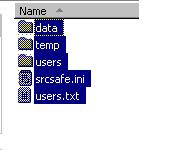
Then in your project folder, create the AnalysisSettings.xml and MigrationSettings.xml and should probably call them from a batch file. Your folder should look something like this

\

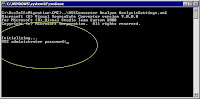
Then you should be able to run your analyze.bat. The analysis will begin and will ask for administrator password as follows


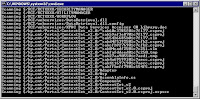
it will then start the scanning and produce usermap.xml

You can then run the Migrate.bat after modifying your usermap.xml. Migration will start

and then complete as follows.